
Activate Recording on a Sonetel phone number
You can easily record all calls to and from your Sonetel phone numbers. Follow these steps to activate call recording on a Sonetel phone number.
- Activate Call recording in your account and set it to "Allowed".
- Scroll to the Phone numbers section shown immediately after signing in at sonetel.com. This is where all your Sonetel Phone numbers are listed.
- Click on Change next to the phone number.

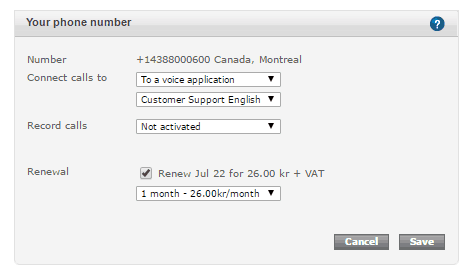
- Record calls The Call recording settings on the Sonetel phone number. The following options are available:
- Not activated. Calls are not recorded, unless the call involves a User that has Call recording activated.
- All calls. All incoming calls received to the phone number and all calls made by a User - where the phone number is shown to the person called - are recorded.
- Incoming calls. All incoming calls received to the phone number are recorded.
- Outgoing calls. All calls made by a User - where the phone number is shown to the person called - are recorded.