
Can I create more voicemail boxes?
Yes. You can create up to 1,000 Voicemail boxes. Maybe you want a Voicemail box for your Sales department or for some other function in your company? To create a Voicemail box, follow these steps:
- Sign in at sonetel.com
- In the Voice app section - click on Add voice app
- Select to create aVoicemail-to-email box.
- You will get a dialogue box as shown below.
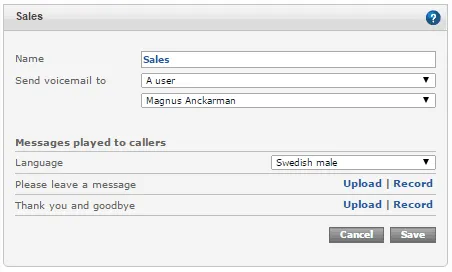
- Name. Any name you would like to give the voicemail box, like "Sales" or "Support"
- Send voicemail to. Provides these options:
- A user. Allows you to select the user within your company that voicemail should be sent to.
- An email address. Allows you to enter any email address to which you want voicemail sent.
- Messages played to callers. The Voicemail box comes with a Greeting message and a goodbye message.
- Language. In case you use the standard prerecorded messages, you can select what languages you want them played in.
- Upload. Allows you to upload a recorded audio file to be played as greeting or goodbye message
- Record. Provides instructions for recording the message over the phone (call *22 from a Sonetel app)
To make your new Voicemail box available to the world, connect a Sonetel phone number or a Voice response service to it.